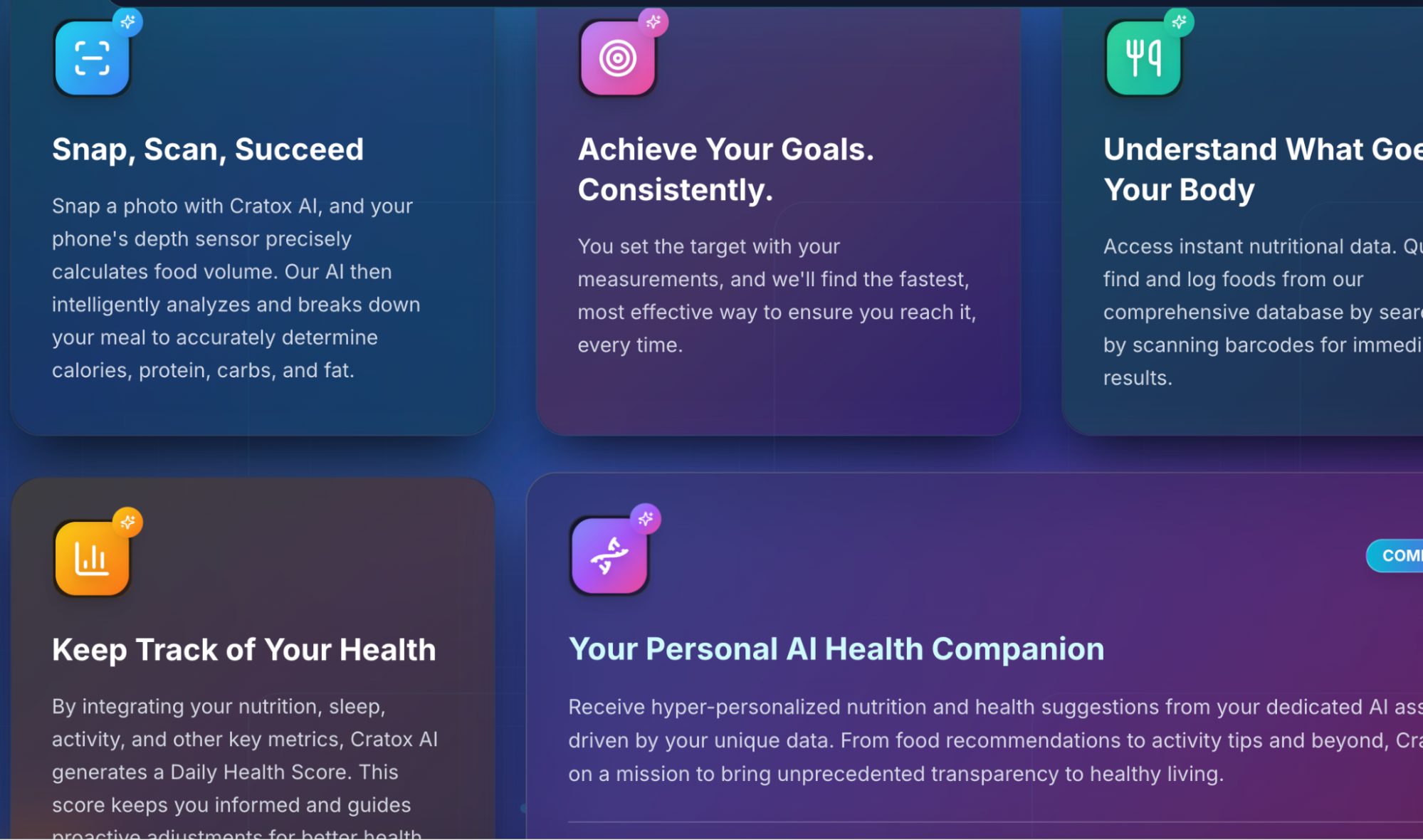
Welcome to the complete documentation for Cratos AI - an innovative health tracking platform that combines AI-powered food recognition, comprehensive nutrition analysis, and personalized health insights. This documentation covers everything from competitive analysis to development planning.
Documentation Menu
Tap any section to explore
🏢 Organisational Resources
Team structure, workflows, and operational guidelines
V1 Tool Stack
Official V1 stack: RevenueCat, AppsFlyer + SKAN, Firebase, Customer.io, OneTrust, ad SDK optimization.
Finance Dashboard
Financial dashboard with revenue tracking, projections, and budget analysis for 2025.
Reporting & Rules
Slack workflow rules, daily/weekly reporting guidelines, and team communication protocols.
Team Structure
Organizational chart, roles and responsibilities, team hierarchy, and contact information.
Workflows
Development workflows, code review processes, deployment procedures, and quality assurance protocols.
Product Roadmap
Strategic timeline from August 2025 through 2027+ covering prototype hardening, MVP launch, and long-term vision.
Templates
Document templates, meeting notes formats, project brief templates, and standardized forms.
New to the project? Start with these recommended sections:
- Features - Get an overview of all planned features and V1 scope
- Competitors - Understand the competitive landscape
- Pre-launch Marketing - Learn about customer personas and marketing strategies
- Journey Plan - Review the 8-week development roadmap
- Metrics - Learn about industry benchmarks and success metrics
This documentation is designed to grow with the project. Additional sections may include:
API documentation, architecture diagrams
UI components, design guidelines
Version history, changelog
Performance data, user insights
CRATOS FINANCE DASHBOARD
Real-time financial tracking with Google Sheets integration
CRATOS INNOVATIONS SRL
Evoluție Lunară Cheltuieli (EUR)
V1 Tool Stack (Official Spec)
RevenueCat, AppsFlyer + SKAN, Firebase, Customer.io, OneTrust, and ad SDKs tuned for in‑app event optimization.
Stack overview
| Category | Tool | Purpose |
|---|---|---|
| Subscriptions | RevenueCat | Manage IAP, entitlements, webhooks; unified receipt validation. |
| Attribution | AppsFlyer + SKAdNetwork | Cross‑network attribution, SKAN, postbacks for optimization. |
| Analytics & A/B | Firebase | GA4, Crashlytics, Remote Config, A/B. |
| Messaging | Customer.io | Email, push, SMS, in‑app journeys. |
| Consent | OneTrust | Consent gating; block non‑essential SDKs. |
RevenueCat — subscriptions
| General purpose | Single source of truth across iOS/Android; paywalls, trials, upgrades/downgrades, restores. |
|---|---|
| iOS dev | Add SDK; init with API key; offerings/paywall; restore/eligibility; send events to GA4/AppsFlyer. |
| Android dev | Add SDK + Play Billing; offerings/proration; validate tokens. |
| Backend & DevOps | Webhook endpoint; persist entitlements; secrets per env; integrations (AppsFlyer/GA4/Customer.io); Slack alerts. |
AppsFlyer + SKAdNetwork — attribution
| General purpose | Measure installs, attribute revenue/events, send postbacks to optimize. |
|---|---|
| iOS dev | Enable SKAN; register SKAdNetwork IDs; SKAN 4 schema; universal/deferred links; ATT timing; privacy manifests. |
| Android dev | Deep links & deferred links; event parity with Firebase. |
| DevOps | Postbacks to Meta/Google/TikTok; maintain SKAN IDs; dashboards/reports. |
| Backend & BI | Consume raw/API; join with RevenueCat for LTV/churn. |
Firebase — GA4, Crashlytics, Remote Config, A/B
| General purpose | Core analytics, crash reporting, feature flags, experiments. |
|---|---|
| iOS dev | Modules: Analytics, Crashlytics, RC, A/B; standard events; RC fetch/activate; guard risky features. |
| Android dev | Same modules; Crashlytics mapping in CI; event parity. |
| DevOps | dev/staging/prod; RC templates versioned; Crashlytics symbols upload; GA4→BQ later. |
| A/B notes | Firebase A/B; paywall tests via RC or RevenueCat variations. |
Customer.io — messaging
| General purpose | Lifecycle messaging for onboarding, trial, conversion, winback, billing issues. |
|---|---|
| iOS dev | SDK; APNs; lifecycle events/attributes; deep links. |
| Android dev | SDK; FCM + channels; match event schema. |
| Backend & DevOps | RevenueCat webhooks trigger journeys; suppression/GDPR; secrets per env. |
OneTrust — consent
| General purpose | Collect/store consent; block non‑essential SDKs; regional rules. |
|---|---|
| Implementation | Load early; categorize SDKs; init AppsFlyer/GA4/Customer.io after consent; persist/forward state. |
| DevOps | Config per env/locale; audit logs; annual review. |
Ad network SDK requirements — optimize for in‑app events
| Network | What to install | Key dev steps | Postbacks & optimization | iOS specifics |
|---|---|---|---|---|
| Meta | Meta SDK or AppsFlyer + CAPI | Events: start_trial, subscribe, renewal | AppsFlyer postbacks; optimize on in‑app events | SKAN via AppsFlyer; ATT timing; add IDs |
| Firebase + AppsFlyer | Import GA4 events or postbacks; tCPA/tROAS when volume | Enable Google ICM via AppsFlyer | Keep SKAN mapping aligned | |
| TikTok | TikTok SDK or AppsFlyer partner | Send required events; deep links | AEO/VBO; event windows in AppsFlyer | SKAN 4 via SDK + AppsFlyer; add IDs |
Use the same event names/revenue across GA4, AppsFlyer, ad SDKs, and RevenueCat.
Implementation checklist — Client apps
- RevenueCat SDK + paywall
- AppsFlyer SDK with SKAN + deep links
- Firebase Analytics, Crashlytics, Remote Config, A/B
- Customer.io SDK + push
- OneTrust gating non‑essential SDKs
- ATT timing + privacy manifests
Implementation checklist — Backend & DevOps
- RevenueCat webhooks for entitlements + messaging
- AppsFlyer postbacks: Meta, Google, TikTok
- RC templates in repo; Crashlytics symbols CI
- Secrets per environment; least‑privilege
Standard event names
| Category | Events |
|---|---|
| Auth & onboarding | first_open, sign_up, onboarding_complete, login |
| Monetization | view_paywall, start_trial, purchase_subscribe, renewal, cancel, refund, billing_issue |
| Engagement | day_1_return, week_1_active, feature_used:[name] |
| Consent & privacy | att_status, push_opt_in, email_opt_in |
Keep names consistent across GA4, AppsFlyer, ad SDKs, Customer.io.
Ownership and environments
| Area | Owner | Environments | Notes |
|---|---|---|---|
| RevenueCat | Mobile lead + Backend | dev, staging, prod | Separate API keys; webhook endpoints per env |
| AppsFlyer | Growth + Mobile | dev, prod | SKAN schemas versioned; partner config documented |
| Firebase | Mobile | dev, staging, prod | RC templates versioned; Crashlytics CI uploads |
| Customer.io | Growth | staging, prod | Staging workspace for journeys |
| OneTrust | Compliance + Mobile | dev, staging, prod | SDK init toggles wired to consent |
Feature Comparison & Cratos V1 Plan
Complete feature analysis comparing Cal AI vs MyFitnessPal vs Cratos with V1 implementation plan
Cratos AI revolutionizes health tracking by combining AI-powered food recognition, comprehensive nutrition analysis, and personalized health insights in one seamless platform. Our V1 focuses on 13 core features that deliver maximum value while ensuring a polished user experience.
| # | Features | Cal AI | MyFitnessPal | Cratos | V1 Inclusion | Feature for V1 (Live Version) |
|---|---|---|---|---|---|---|
| 1 | Food Database Search | Yes | Yes | Needed | Yes | Can be easy to implement for free. |
| 2 | Scan Food (AI) | Yes | Yes | Needed | Yes | It's a main feature. |
| 3 | Barcode Scanner | Yes | Yes | Needed | Yes | Free APIs out there |
| 4 | Water Log | Yes | Yes | Needed | Yes | Easy to do. |
| 5 | Calories & Macros Tracker | Yes | Yes | Needed | Yes | Easy to do, part of the main feature. |
| 6 | Activity Tracker | Yes | Yes | Needed | Yes | Via iOS Health Kit. |
| 7 | Sleep Tracker | No | No | Needed | Yes | But only via iOS Health Kit to calculate Health score. |
| 8 | Health Score | No | No | Needed | Yes | But should be minimal, nothing fancy at first. |
| 9 | Digestive Tracker | No | No | Yes | Yes | But just the info how long the digesting process takes. |
| 10 | Gamification | Yes (Minimal - streak and calorie goals) | Yes (Minimal - calorie goals) | Needed | Yes | Focused on achieving goals and logging food/water. |
| 11 | Calorie Intake Target Bar | Yes (but different) | Yes (but different) | Needed | Yes | |
| 12 | Calorie Intake Source Bar (good vs bad) | No | No | Needed | Yes | |
| 13 | Basic Health Stats Display | Yes | Yes | Needed | Yes | Daylight auto tracker, resting heart rate, steps, exercise minutes, calories burned via HealthKit |
| 14 | Food Label Scanner | Yes | No | Unsure if needed | TBD | Can be implemented but the API is probably going to be paid |
| 15 | Voice Log | No | Yes | Needed | No | Probably a little more complicated to implement |
| 16 | AI Assistant | No | No | Needed | No | This feature is complex. |
| 17 | Breathing Exercises | No | No | Needed | No | This is a more complex feature and we need to take some time to implement it right. The Apple Watch already has simple Mindfulness and Breathing apps. So we should do something way more useful. |
| 18 | Stretching Exercises | No | Yes (workouts) | Needed | No | Same as the Breathing feature, can be complex and should be handled exclusively. |
| 19 | Weekly Goal / Commitment | No | No | Needed | No | Not now. |
- ✅ Scan Food with AI (needs prompt optimization)
- ✅ Calories & Macros Tracker
- ✅ Water Log
- ✅ Activity Tracker (Apple HealthKit)
- ✅ Sleep Tracker (needs fixing)
- 🔬 Food Database Search (research ongoing)
- 🔬 Food Barcode Scanner (research ongoing)
- 🔬 Food Score AI Results
- ⏳ Add Manual Activity
- ⏳ Gamification
22 days to V1 launch • Design 90% done • Pre-launch Marketing 100% done
Feature Complexity Analysis
Features grouped by implementation complexity and priority for iOS development
This overview organizes Cratos features by implementation complexity, merging similar features under intuitive categories. Each section includes primary and secondary features to help prioritize development efforts.
🟢 Low Complexity Features
Food & Nutrition Tracking
• Daily calorie budget visualization
• Calorie Intake Target Bar
• Calorie Intake Source Bar (good vs bad food sources)
• Progress visualization (pie or bar charts)
• Custom macro goals or default ratio
• Goal setting
• Reminders
• Progress visualization
Wellness Metrics
• Sleep quality visualization
• Sleep duration tracking
• Daily/weekly trends
• Minimal visualization for V1
• Food digestion time estimates
Basic Gamification
• Visual progress indicators
• Simple achievements for hitting milestones
• Simple celebrations when hitting targets
🟡 Medium Complexity Features
Food Database & Manual Logging
• Autocomplete search suggestions
• Portion size adjustments
• Frequent items caching
• Camera overlay UI
• UPC matching with database
• Quick logging from scan results
Activity & Exercise Tracking
• Active energy reading
• Workouts sync
• Calorie adjustment based on activity
• Common exercise database
• Calorie burn estimates
Advanced Gamification
• Progress tracking for badges
• Achievement display interface
• Unlockable content
🔴 High Complexity Features
AI-Powered Food Recognition
• Third-party SDK integration or custom model
• Food identification
• Portion size estimation
• Nutrition extraction
• User confirmation interface
• Multiple food item detection
• Label parsing algorithms
• Data extraction & formatting
Advanced User Interaction
• Natural language processing
• Food & quantity extraction
• Confirmation workflow
• Nutrition advice
• Diet & meal suggestions
• Progress insights
Complex Wellness Features
• Stretching routines
• Animation/video content
• Progress tracking
• Integration with Apple Watch capabilities
• Progress tracking
• Accountability features
• Intelligent adjustments based on performance
Competitor Analysis
In-depth review of health and nutrition app competitors with comprehensive market insights
Overall Summary: Weight loss is and will continue to be the #1 reason why people download health & nutrition related apps. With the current feature list, we can primarily target gym enthusiasts and weight loss-focused individuals as our core audiences. The future is AI-driven hyper-personalization, led by wearable collected data and tailored to the user's needs & health goals.
👥 Demographics by Provider
1. MyFitnessPal
Age: Primarily 25–44; largest group is 25–34
Gender: Skews slightly female (~55–60%)
Income/Education: Middle to high-income; majority have college degrees
Location: Predominantly U.S. (~63% of users), also popular in UK, Canada, Australia
Goals: Weight loss, calorie tracking, exercise logging
Key Differentiator: Huge food database, barcode scanner, community support, integration with other apps/devices
2. Cal AI
Age: Primarily Gen Z and college students (15–25)
Gender: Mixed, likely 50/50
Income/Education: Students and young professionals; tech-savvy
Location: U.S. and Canada primarily
Goals: Fast, AI-powered calorie logging, quick food recognition
Key Differentiator: Speed, convenience, AI-driven nutrition labeling, easy meal logging via images
4. Noom
Age: 30–55, with a large portion in the 35–44 range
Gender: Mostly female (~70%)
Income/Education: Higher income and education; wellness-conscious professionals
Location: Mainly U.S., UK, Australia
Goals: Long-term weight loss, behavior change
Key Differentiator: Psychology-based coaching, habit tracking, structured programs
5. Lose It!
Age: 25–45
Gender: Fairly balanced, slight female lean
Income/Education: Middle-income; educated
Location: Strong U.S. user base
Goals: Calorie and macro tracking, weight management
Key Differentiator: Simplicity, barcode scanning, goal tracking features
6. Lifesum
Age: 20–40
Gender: Majority female (~60%+)
Income/Education: Middle-to-upper income; wellness-conscious
Location: Europe (especially Sweden, UK, Germany), U.S.
Goals: Healthy eating, diet planning (keto, paleo, etc.), weight management
Key Differentiator: Diet plan variety, attractive UI, food quality scores
7. Cronometer
Age: 30–55
Gender: Slightly more female
Income/Education: Higher education and income; nutrition-focused users
Location: U.S., Canada
Goals: Detailed micronutrient tracking, custom nutrition
Key Differentiator: Deep nutrient analysis, precision tracking, keto/vegan users
🔍 Feature Comparison Analysis
| Feature | Cal AI | MyFitnessPal | Lose It! | Noom | Lifesum | Cronometer | MyNetDiary |
|---|---|---|---|---|---|---|---|
| Manual Food Logging (DB) | Yes (AI-augmented) | Yes (14M+ foods) | Yes (56M+ foods) | Yes (color coding) | Yes (extensive) | Yes (curated DB) | Yes (1.7M verified) |
| Barcode Scanning | Yes | Yes (Premium in some areas) | Yes (free) | Yes | Yes | Yes (free) | Yes (free) |
| AI Image Meal Logging | Yes (core feature) | Yes (MealScan, Premium) | Yes (Snap It) | Yes (launched 2024) | Yes (Multimodal) | No | Yes (AI Meal Scan) |
| Voice Logging | No | Yes (Premium) | Yes | Yes | Yes | No | Yes (via Siri/Voice) |
| Macro Tracking | Yes (basic macros) | Yes (detailed in Premium) | Yes (macros + more) | Yes (optional) | Yes | Yes (very detailed) | Yes |
| Activity & Exercise Tracking | Limited | Yes (broad integrations) | Yes (HealthKit etc.) | Steps import, mostly coaching | Yes (HealthKit etc.) | Yes (wide device sync) | Yes (HealthKit etc.) |
| Sleep Tracking | No | No | Yes (via integration) | Minimal (coaching only) | Minimal (if user syncs HealthKit) | Yes (via HealthKit) | Minimal (via HealthKit) |
| Gamification | Minimal reminders | Streaks + community | Badges, challenges | Group coaching | Life Score, minor badges | None | Streaks, tips |
💰 Pricing Comparison
| App Name | 1 month | 12 months | Lifetime | Model |
|---|---|---|---|---|
| Cal AI | $9.99 | $30.00 | N/A | Only Paid |
| MyFitnessPal | $19.99 | $79.99 | N/A | Freemium |
| Caloscan AI | $11.99 | $34.99 | $49.99 | Only Paid |
| Cronometer | $10.99 | $59.88 | N/A | Freemium |
| Lose It! | N/A | $39.99 | $149.99 | Freemium |
| Noom | $70.00 | $209.00 | N/A | Only Paid |
- Over half are between 25-34 years old
- Women comprise 60%–75% of diet app users
- US accounts for 30% of global revenue
- Weight loss is primary motivation for 50%+
- Most apps only available in English
- Limited micronutrient tracking
- Lack of holistic approach
- Minimal AI personalization
- Wearable-based health tracking
- AI-driven hyper-personalization
- Context-aware suggestions
- Personal AI health assistants
Cratos V1 Accelerated Journey Plan
From AI Prototype to Production-Ready App in 8 Weeks
This accelerated journey plan outlines the process of transforming our AI-generated prototype into a production-ready app in 1-2 months, focusing specifically on the approved V1 features that will deliver maximum value.
📅 Phase-by-Phase Breakdown
Phase 1: Code Review & Planning
• Architecture Refinement: Identify needed improvements
• Development Environment: Set up proper workflow
• Dependencies Audit: Evaluate third-party libraries and APIs
• Technical Planning: Create detailed implementation roadmap
Phase 2: Core Features
• Water Log (~2 days): Water logging interface, goal setting & reminders, progress visualization
Phase 3: Integration & Advanced Features
• Sleep Tracking via HealthKit (~1 day): Sleep data integration, quality visualization
• Activity Tracking (~2 days): HealthKit integration, step count & active energy
• Basic Health Stats Display (~2 days): Daylight tracking, resting heart rate, exercise minutes
• UI Polish & Integration (~1 day): Consistent design, optimized navigation
Phase 4: AI & Complex Features
• Gamification Implementation (~3 days): Daily logging streak counter, goal achievement tracking, progress indicators
Phase 5: Testing & Launch
• Edge Case Handling: Improve offline capabilities, error handling
• Bug Fixing: Address critical issues
• Performance Optimization: Fine-tune app responsiveness
• TestFlight Distribution: Final pre-launch testing
• App Submission & Launch: Submit to App Store and release
✅ V1 Features Summary
- 1. Food Database Search
- 4. Water Log
- 5. Calories & Macros Tracker
- 2. Scan Food (AI)
- 3. Barcode Scanner
- 6. Activity Tracker
- 7. Sleep Tracker
- 8. Health Score
- 13. Basic Health Stats Display
- 9. Digestive Tracker
- 10. Gamification
- 11. Calorie Intake Target Bar
- 12. Calorie Source Bar (good vs bad)
- Total Development Time: 8 weeks (2 months)
- Code Review & Planning: 1 week
- Core Implementation: 4 weeks
- Advanced Features: 2 weeks
- Testing & Launch: 1 week
- Daily Active Users (DAU)
- Food logging retention rate (7-day, 30-day)
- AI recognition accuracy and usage rate
- Feature engagement across all 13 V1 features
- App Store ratings and user sentiment
- Address user-reported bugs
- Improve food database coverage
- Optimize AI food recognition accuracy
- Fine-tune digestive tracking information
Health & Fitness App Market Metrics
Industry benchmarks and key performance indicators for success
Health & Fitness apps are among the top-performing categories for both trial conversions and long-term revenue generation, making them ideal for subscription-based monetization strategies.
Download to Trial Conversion
- Strong onboarding drives conversions
- Value messaging is crucial
- Wide performance gap exists
Trial to Paid Conversion
- Habit-forming features boost conversion
- Progress tracking essential
- Longer trials (17-32 days) perform better
Pricing Strategy
- Premium pricing indicates high value
- Targets committed users
- Annual plans offer best retention
Revenue per Install
- Strongest long-term potential
- Retention drives revenue
- Upselling opportunities
LTV per Payer
- Highest LTV across all categories
- Consistent growth pattern
- Monitor 2-5% refund rates
Retention Metrics
- Annual plans show highest retention
- Long-term engagement crucial
- Weekly plans underperform
- Strong subscription fit
- Higher yearly pricing ($99.99+)
- Hard paywalls with clear value
- Focus on annual plans
- Higher refund rates (2-5%)
- Weekly/monthly churn
- Need habit-building features
- Long trials recommended
- Strong onboarding flow
- Progress visualization
- Habit formation features
- Value delivery over time
- iOS CPI: ~$9.22 globally
- High CPPU in mature markets
- Strong ROI potential
- CAC vs LTV balance crucial
| Platform | Top Quartile LTV | Median LTV | Bottom Quartile LTV |
|---|---|---|---|
| App Store | $83.88 | $49.57 | $25.98 |
| Google Play | $88.74 | $56.40 | $29.40 |
Health & Fitness apps represent one of the strongest categories for subscription monetization, with exceptional trial conversion rates, premium pricing tolerance, and robust long-term revenue potential. Success depends on execution: quality onboarding, habit-building features, and consistent value delivery.
User Personas
Understanding our target audience and market opportunities
Key Insight: Weight loss is and will continue to be the #1 reason why people download health & nutrition related apps. With our current feature list, we can primarily target gym enthusiasts and weight loss-focused individuals as our core audiences.
Over half of all health & fitness app users are between 25 and 34 years old
Women comprise roughly 60%–75% of the user base for diet and nutrition apps
US accounts for 30% of global health & fitness app revenue
Users tend to have higher-than-average incomes and education levels
Primary Target Personas
The Gym Enthusiast
15-25 years old, student or early career, lives in Western countries, has disposable income for subscriptions
Achieve bodybuilder/fitness influencer physique, gain muscle, track macros, hit caloric & protein targets
Appearance, community belonging, social media presence, attraction
Instagram, TikTok, fitness communities
- Clean modern design that's "cooler" than competitors
- Gamification elements (medals, leaderboards, streaks)
- Performance-oriented UI with micronutrient tracking
- Social features for community engagement
The Weight Loss Focused Adult
30-55 years old, male or female, educated, financially stable
Lose weight, look better/younger, improve overall fitness and health
Appearance improvement, preparing for events (vacations), family health responsibilities
Facebook, Instagram, online communities, health articles
- Clean and inviting design
- Guided weight loss journey (similar to Noom)
- Educational content about nutrition
- Possibly workout plans integration
- Micronutrient tracking for health optimization
Secondary Market Personas
The Pro/Semi-Pro Athlete
15-34 years old, predominantly male, globally diverse
Performance improvement, injury prevention, career longevity
- Advanced performance metrics
- Competition preparation features
- Recovery optimization tools
The Health Enthusiast
30-60+ years old, male or female, educated, affluent
Longevity, disease prevention, maintaining youthful biology
- Longevity-focused insights
- Comprehensive health data integration
- Preventive health recommendations
The Medically Diagnosed
30-55+ years old, globally diverse
Manage existing conditions (diabetes, hypertension, IBS)
- Condition-specific tracking
- Medical professional integration
- Specialized nutrition recommendations
The future is AI-driven hyper-personalization, led by wearable-collected data and tailored to the user's needs & health goals. This would enable us to target every persona effectively.
- Multi-language support (most apps English-only)
- Holistic health approach vs. simple macro tracking
- Limited AI personalization beyond caloric needs
- Comprehensive micronutrient tracking
- Wearable-based health tracking integration
- Health data-driven nutritional planning
- Personal AI assistant for motivation
- Context-aware recommendations (location, weather, goals)
| Persona | Primary Motivation | Key Features Needed | Monetization Potential |
|---|---|---|---|
| Gym Enthusiast | Muscle gain & performance | Macro tracking, gamification, social features | High (tech-savvy, willing to pay) |
| Weight Loss Adult | Weight loss & health improvement | Guided journey, education, simple tracking | Very High (largest market segment) |
| Pro Athlete | Performance optimization | Advanced metrics, recovery tracking | Medium (smaller but premium market) |
| Health Enthusiast | Longevity & prevention | Comprehensive health integration | High (affluent, health-conscious) |
Infrastructure Documentation
Complete infrastructure planning and development analysis
Infrastructure Proposals
Comprehensive AWS infrastructure proposals for scaling to 1 million users with 5 production-ready architecture options
Cratos Health App is a next-generation personalized wellness platform that transforms health data into actionable insights through AI-powered analysis and real-time optimization.
🎯 Key Requirements
- Target Scale: 1 Million Monthly Active Users (MAU)
- Performance: Global response times <200ms
- AI Features: OpenAI GPT-4 Vision for food recognition
- Real-time: Live health data sync and notifications
- Compliance: HIPAA-compliant global infrastructure
- Integration: Apple HealthKit and lab test analysis
$67,250/month (1M MAU) | $6,530/month savings | 40% faster development
⚖️ Architecture Comparison (5 Options)
| Architecture | Monthly Cost & Scale | Key Benefits | Best For |
|---|---|---|---|
| 1. EKS + API Gateway | $73,780/month (1M MAU) $0.074/user |
Maximum control, REST standards, Kubernetes flexibility | Teams with K8s expertise, complex networking needs |
| 2. EKS + AppSync ⭐ | $67,250/month (1M MAU) $0.067/user |
40% faster development, real-time features, cost optimization | Mobile-first apps, real-time requirements, balanced approach |
| 3. AppSync + Lambda | $58,500/month (1M MAU) $0.059/user |
Serverless simplicity, auto-scaling, lowest cost | Rapid development, minimal ops, event-driven architecture |
| 4. Cost-Optimized MVP 💰 | $1,200-4,000/month (0-10k users) $0.40-2.40/user at small scale |
Ultra-low startup cost, rapid validation, clear growth path | Startup MVP, budget-conscious, product validation phase |
| 5. API Gateway + Lambda ⚡ | $52,800/month (1M MAU) $0.053/user |
Pure serverless, REST API simplicity, zero infrastructure management | Traditional REST apps, serverless-first teams, minimal DevOps |
$67,250/month (1M MAU) | $6,530/month savings | 40% faster development
Hybrid approach combining EKS microservices with AWS AppSync for unified GraphQL API layer. Provides optimal balance of control, performance, and development velocity with built-in real-time capabilities.
- Amazon EKS clusters with optimized node groups
- AWS AppSync GraphQL unified API layer
- Aurora Serverless v2 + DynamoDB Global Tables
- Real-time GraphQL subscriptions out-of-the-box
- Live health data updates via GraphQL subscriptions
- Real-time notifications for health alerts
- Instant food log sync across all devices
- Offline sync with conflict resolution
🔧 Core Infrastructure Components
Container Orchestration
- us-east-1: 48 nodes, 240 vCPU (Primary)
- eu-west-1: 36 nodes, 180 vCPU
- ap-southeast-1: 24 nodes, 120 vCPU
- sa-east-1: 10 nodes, 50 vCPU
GraphQL API Layer
- Real-time health data updates
- Automatic mobile SDK generation
- Multi-layer caching optimization
- Type-safe development workflow
Database Architecture
- Aurora Serverless v2 auto-scaling
- DynamoDB real-time health vitals
- Cross-region replication
- Point-in-time recovery
Security & Compliance
- KMS encryption at rest
- TLS 1.3 encryption in transit
- AWS WAF protection
- Multi-factor authentication
Disaster Recovery
- RTO: < 5 minutes
- RPO: < 1 minute
- Route53 health checks
- Automated orchestration
Backup Strategy
- Continuous Aurora backups
- DynamoDB point-in-time recovery
- 35-day retention for PHI
- 7-year compliance archival
📋 Cost Breakdown (EKS + AppSync Architecture)
| Infrastructure Component | Monthly Cost | Percentage | Description |
|---|---|---|---|
| EKS Clusters (4 regions) | $32,500 | 48.4% | Container orchestration with optimized node groups (us-east-1, eu-west-1, ap-southeast-1, sa-east-1) |
| OpenAI API | $15,000 | 22.3% | GPT-4 Vision for food recognition + health insights processing |
| DynamoDB Global Tables | $3,525 | 5.2% | Real-time health vitals with cross-region replication and auto-scaling |
| AppSync GraphQL API | $2,170 | 3.2% | Unified API layer with real-time subscriptions and caching |
| Aurora Global Database | $1,614 | 2.4% | PostgreSQL 15.4 Serverless v2 with global replication |
| ElastiCache Redis | $787 | 1.2% | Session storage and application caching |
| S3 + CloudFront | $630 | 0.9% | File storage and global CDN for static assets |
| Datadog Monitoring | $3,700 | 5.5% | APM, logs, infrastructure monitoring and alerting |
| Other Third-party | $7,324 | 10.9% | Customer.io, LaunchDarkly, AppsFlyer, RevenueCat, etc. |
| Total Monthly Cost | $67,250 | 100% | $0.067 per monthly active user at 1M scale |
For startups: Start with $1,200-4,000/month (0-10k users) using simplified architecture, then migrate to full EKS + AppSync when you reach scale.
🚀 Implementation Timeline
Foundation & Landing Zone
- AWS Control Tower setup
- Network architecture (VPC, Transit Gateway)
- Security baseline (GuardDuty, Config)
- Terraform modules development
Core Infrastructure
- EKS clusters deployment
- Aurora Global Database setup
- AppSync API integration
- Monitoring and alerting
Application Deployment
- Microservices deployment
- AI services integration
- iOS app integration
- End-to-end testing
Production Readiness
- Security audit & penetration testing
- Disaster recovery testing
- HIPAA compliance validation
- Production deployment & go-live
📈 Scaling Milestones (EKS + AppSync)
| Growth Phase | User Count | Monthly Cost | Cost per User | Infrastructure Changes |
|---|---|---|---|---|
| Phase 1: MVP | 0-5k users | $3,245 | $0.649 | Single region (us-east-1) with basic setup |
| Phase 2: Growth | 5k-50k users | $8,450 | $0.338 | Add eu-west-1 region, full real-time features |
| Phase 3: Scale | 50k-200k users | $24,750 | $0.198 | Add ap-southeast-1, auto-scaling optimization |
| Phase 4: Enterprise | 200k-1M users | $67,250 | $0.067 | Full global deployment with sa-east-1 |
🏗️ Option 1: EKS + API Gateway Architecture
Architecture Overview
Traditional microservices approach using Amazon EKS for container orchestration with API Gateway for REST API management. Provides maximum flexibility and control over the infrastructure.
Core Components
Microservices Architecture
- Maximum microservices control and architectural flexibility
- REST API standards familiar to most development teams
- Kubernetes ecosystem with extensive tooling and community
- Advanced networking with Istio service mesh capabilities
- Higher operational complexity with Kubernetes management overhead
- Manual real-time implementation required for live features
- Requires DevOps expertise for effective EKS operations
- Highest cost among the options
🏗️ Option 2: EKS + AppSync Architecture (⭐ Recommended)
💡 SAVES $6,530/month vs Option 1 (8.9% reduction)
Architecture Overview
Hybrid approach combining EKS microservices with AWS AppSync for unified GraphQL API layer. Provides optimal balance of control, performance, and development velocity with built-in real-time capabilities.
AWS AppSync Unified API
EKS Microservices (Optimized)
- Live health data updates via GraphQL subscriptions
- Real-time notifications for health alerts and recommendations
- Instant food log sync across all user devices
- Offline sync with conflict resolution for mobile apps
🏗️ Option 3: AppSync + Lambda Architecture
💡 SAVES $15,280/month vs Option 1 (20.7% reduction)
Architecture Overview
Fully serverless approach using AWS Lambda functions with AppSync GraphQL API. Provides maximum cost efficiency, automatic scaling, and minimal operational overhead.
Lambda Functions Architecture
Event-Driven Architecture
🏗️ Option 4: Cost-Optimized MVP (💰 Startup-Friendly)
🚀 Bootstrap Cost (0-1k users): $1,200 ($1.20+/user)
Architecture Overview
Ultra-lean single-region approach using EKS with REST APIs, designed for rapid MVP development and maximum cost efficiency while maintaining clear scalability paths for growth.
MVP Terraform Configuration
- Functional iOS App: User registration, food logging, health tracking
- Security: JWT authentication, HTTPS, basic data encryption
- Performance: API response times <500ms, mobile app loads <3s
- Cost Control: Monthly costs under $2,500 for first 5k users
🏗️ Option 5: API Gateway + Lambda (⚡ Pure Serverless)
REST API Architecture
🚀 Technical Implementation Guide - EKS + AppSync
⭐ Complete Production Implementation for Option 2 (Recommended)
This comprehensive technical guide provides production-ready implementation details for the EKS + AppSync architecture, covering all aspects from AWS Landing Zone setup to disaster recovery strategies.
Architecture Cost: $67,250/month with enterprise-grade security and compliance
Timeline: 16 weeks from inception to production deployment
1️⃣ AWS Landing Zone & Well-Architected Framework
AWS Control Tower Setup
Well-Architected Pillars Implementation
2️⃣ Terraform Infrastructure as Code
Repository Structure
VPC Module
EKS Cluster Module
Aurora Global Database Module
AppSync GraphQL API Module
3️⃣ Security Implementation
Network Security
HIPAA Compliance Security Controls
4️⃣ Disaster Recovery Strategy
Multi-Region Active-Active Architecture
5️⃣ Implementation Timeline
| Phase | Duration | Key Activities | Deliverables |
|---|---|---|---|
| Phase 1: Foundation | Weeks 1-4 | AWS Control Tower setup, Network architecture, Security baseline | Working EKS cluster, Database connectivity, SSL setup |
| Phase 2: Core Infrastructure | Weeks 5-8 | EKS deployment, Aurora Global Database, AppSync integration | Full infrastructure stack, Monitoring and alerting |
| Phase 3: Application Deployment | Weeks 9-12 | Microservices deployment, AI services integration, iOS app integration | Working application, End-to-end testing |
| Phase 4: Production Readiness | Weeks 13-16 | Security audit, Disaster recovery testing, HIPAA compliance validation | Production deployment and go-live |
This comprehensive infrastructure proposal provides 5 production-ready architecture options designed for scaling Cratos Health App from startup MVP to 1 million users globally, with complete technical implementation guides, Terraform infrastructure-as-code, security frameworks, and disaster recovery strategies.
With this implementation guide, your team has everything needed to build and deploy a world-class health application supporting 1 million users globally with 99.99% uptime, HIPAA compliance, and enterprise-grade security. Choose your architecture based on team expertise, budget, and scaling timeline.
This comprehensive infrastructure specification delivers everything needed for production deployment:
Three architecture options with detailed cost analysis and trade-offs
Production-ready Terraform modules for all AWS services
HIPAA-compliant architecture with defense-in-depth security
Multi-region active-active with <5 minute RTO
Infrastructure Development Analysis
DevOps Architect + AI vs Enterprise Team Requirements - June 2025 Report
Product: AI-Powered Health & Nutrition Platform
Technology: iOS App + NestJS Microservices + AWS Infrastructure
Development Time: 200 hours over 1 month (evenings/weekends)
Development Team: DevOps Architect (Laur) + Claude AI Assistant
Achievement: Complete enterprise platform, 11-17x faster with 96% cost reduction vs traditional team
🏗️ TECHNICAL ARCHITECTURE DELIVERED
Infrastructure Mastery
- Multi-Account AWS - Shared Services + Dev separation
- EKS with Karpenter - Auto-scaling Kubernetes cluster
- Route53 DNS Strategy - Global domain delegation
- IRSA Security - Fine-grained IAM for K8s
AI/ML Integration
- Multi-Model Support - GPT-4o, GPT-4o-mini, GPT-4-turbo
- 99.9% JSON Parsing - Improved from 85% success rate
- Cost Optimization - 80% reduction with smart model selection
- Real-time Configuration - Dynamic AI switching
Performance Engineering
- 3-Tier Caching - Memory → Redis → Database
- 10x Performance - Eliminated DB calls in hot path
- 60% Faster Responses - Optimized AI model selection
- Image Optimization - Model-specific compression
Production Security
- JWT with MFA - Multi-factor authentication
- RBAC System - Role-based access control
- API Security - Helmet.js, CORS, validation
- Secret Management - AWS-based secret handling
⏱️ DEVELOPMENT BREAKDOWN: 200 HOURS
| Phase | Duration | Key Deliverables | Complexity |
|---|---|---|---|
| Infrastructure Foundation | 60 hours | AWS Multi-Account + EKS + DNS + Docker | Enterprise-grade |
| Auth Microservice | 25 hours | JWT + User Management + Basic RBAC | Production-ready |
| Food AI Service | 45 hours | OpenAI GPT-4o + Configuration + Caching | AI/ML Complex |
| Database Migration | 30 hours | TypeORM→Prisma + 11 Tables + Redis | Enterprise-scale |
| Firebase Migration | 20 hours | iOS App Backend Integration | Complex migration |
| Admin Panel | 15 hours | Real-time Configuration Management | Professional UI |
| API Gateway & Services | 5 hours | Nginx + Lab & Weather Services | Microservices |
👥 EQUIVALENT TEAM REQUIREMENTS
| Role | Duration | Rate (EUR/day) | Total Cost |
|---|---|---|---|
| Senior DevOps Engineer | 30 days | €400-600 | €12,000-18,000 |
| Senior Backend Developer | 40 days | €300-400 | €12,000-16,000 |
| Frontend Developer | 30 days | €200-300 | €6,000-9,000 |
| Database Engineer | 25 days | €180-240 | €4,500-6,000 |
| iOS Developer | 15 days | €200-300 | €3,000-4,500 |
| Project Manager | 60 days | €150-200 | €9,000-12,000 |
| QA Engineer | 20 days | €120-180 | €2,400-3,600 |
| Total Traditional Team | 220 days | 7 professionals | €48,900-69,100 |
💡 ACTUAL DEVELOPMENT APPROACH
Total Development Time: 200 hours
Total Investment: €700-1,000 (Claude + AWS)
What Was Actually Delivered in 200 Hours:
Infrastructure Foundation
- AWS Multi-account setup + EKS cluster
- Route53 DNS with global delegation
- Docker optimization & CI/CD templates
Production Microservices
- 4 Production Microservices (NestJS + TypeScript)
- Advanced AI Integration (OpenAI GPT-4o)
- Real-time configuration management
Data Architecture
- Complete Database Migration (11 tables)
- TypeORM → Prisma + 3-tier caching
- Firebase → Backend Migration
Production Features
- JWT auth + multi-food selection
- Admin panel with real-time analytics
- Multi-stage Docker builds
🛣️ DEVELOPMENT ROADMAP
Phase 1: Foundation
- AWS Multi-Account Setup
- EKS Cluster Foundation
- Backend Microservices
- Data Architecture
Phase 2: Production Optimization
- Karpenter Auto-Scaling (WIP)
- Queue-Based AI Processing
- Monitoring Stack
- Advanced Authentication
Phase 3: Enterprise Features
- Multi-Region Deployment
- Advanced Analytics
- Enterprise Security
- HIPAA Compliance
Phase 4: Scale & Innovation
- Horizontal Scaling
- Advanced AI Features
- Custom AI Models
- Multi-Language Support
🏆 COMPETITIVE POSITIONING
| Feature | Strava (Early) | MyFitnessPal (Early) | Cratos Health |
|---|---|---|---|
| Architecture | Monolith | Monolith | Microservices ✅ |
| AI Integration | None | None | AI-First ✅ |
| Infrastructure | Basic | Basic | Enterprise AWS ✅ |
| Monitoring | Basic logs | Basic logs | Full Observability ✅ |
| Admin Tools | Simple | Simple | Real-time Analytics ✅ |
🔍 CONCLUSION
In just 200 hours over 1 month, a single DevOps Architect using Claude AI has delivered a complete enterprise technology foundation that would typically require a team of 7 professionals working 2,240-3,360 hours and €48,900-69,100 investment.
Solo Achievement vs Traditional Team:
- Traditional Team Required: 7 professionals, 2,240-3,360 hours (€48,900-69,100)
- Actual Resources: DevOps Architect, 200 hours + Claude AI (€700-1,000)
- Time Efficiency: 11-17x faster than traditional team
- Cost Savings: €48,000-68,400 (98% cost reduction)
- Technology Level: Comparable to pre-IPO health unicorns
Current Status: Cratos Health now possesses a production-ready technology foundation worth €48,000-68,400 at traditional development costs, achieved in 200 hours with 98% cost reduction. This demonstrates a revolutionary paradigm in software development efficiency.